Remote for Fire TV & FireStick
- 4.0
- Rating
- 10.00M
- Installs
- Free
- Price
 Analysis by App-foxy
When a physical Fire TV remote is missing, the problem is rarely the streaming service itself. It is the few seconds of searching under cushions, checking another room, and trying to control the television without the tool that normally makes everything simple. Remote for Fire TV & FireStick from BoostVision is built around solving that specific annoyance with a phone-based remote, while also bringing screen mirroring into the same entertainment-focused app. I tested it with the mindset of an everyday viewer rather than a power user, and my overall impression is that its value depends heavily on how quickly it connects in your particular home.
This is a free Android app in the Entertainment category, with optional in-app purchases ranging from $3.99 to $29.99 per item. It is rated for Everyone, works from Android 7.0 onward, and version 1.9.7 is the current version. Its popularity is easy to understand: it has passed five million installs, with an average rating of 4.1 from about 87 thousand ratings and roughly 6.1 thousand written reviews. Those figures suggest a broadly useful tool, but not one that removes every setup or compatibility frustration.
What the phone remote changes in everyday use
I find the phone remote most useful when it removes a small interruption rather than changing how I watch TV. It can help me get back to browsing or enter a title without hunting for the physical controller, but that convenience depends on the phone and Fire TV being able to find each other. That makes the next question less about buttons and more about where I’m using the app.
You May Also Like

 Blood Strike: 2.5 Anniversary
Blood Strike’s Loadouts Turn Every Drop Into a Tactical Gamble
A close look at Blood Strike’s custom loadouts: how fast access to signature weapons reshapes its battle royale rhythm, rewards preparation, and narrows the gap between fights.

 Pandora - Music & Podcasts
Pandora’s Music Is Easy to Start, but Harder to Recover
Pandora’s strength is its low-effort path from a seed to a station. Its weak spot is how much confidence it asks you to place in connection, setup, and quiet recovery.

 8 Ball Pool
 Is Built on Rivalries, Rematches, and Routine
A close look at the rivalries, rematches, shared routines, and unanswered safety questions that turn a quick pool match into a persistent mobile community.

 Samsung Music
’s Quiet Strength Is Playing What You Already Own
Its reach comes less from spectacle than from dependable access to a personal library. That simplicity is both the app’s strongest retention engine and its ceiling.

 AccuWeather: Weather Radar
AccuWeather Review: A Quick, Clear Forecast for Everyday Decisions
For everyday plans, the best forecast is the one you can understand quickly. AccuWeather makes rain timing, radar, and local conditions easy to act on, with a few trade-offs.

 Hill Climb Racing
Why Hill Climb Racing Still Turns Crashes Into One More Run
A tiny car, a bumpy hill and one more upgrade: Hill Climb Racing keeps resurfacing because its simple chaos makes every near-miss feel personal.
More From Our News Desk



The main capability is convenience, not a replacement for every remote
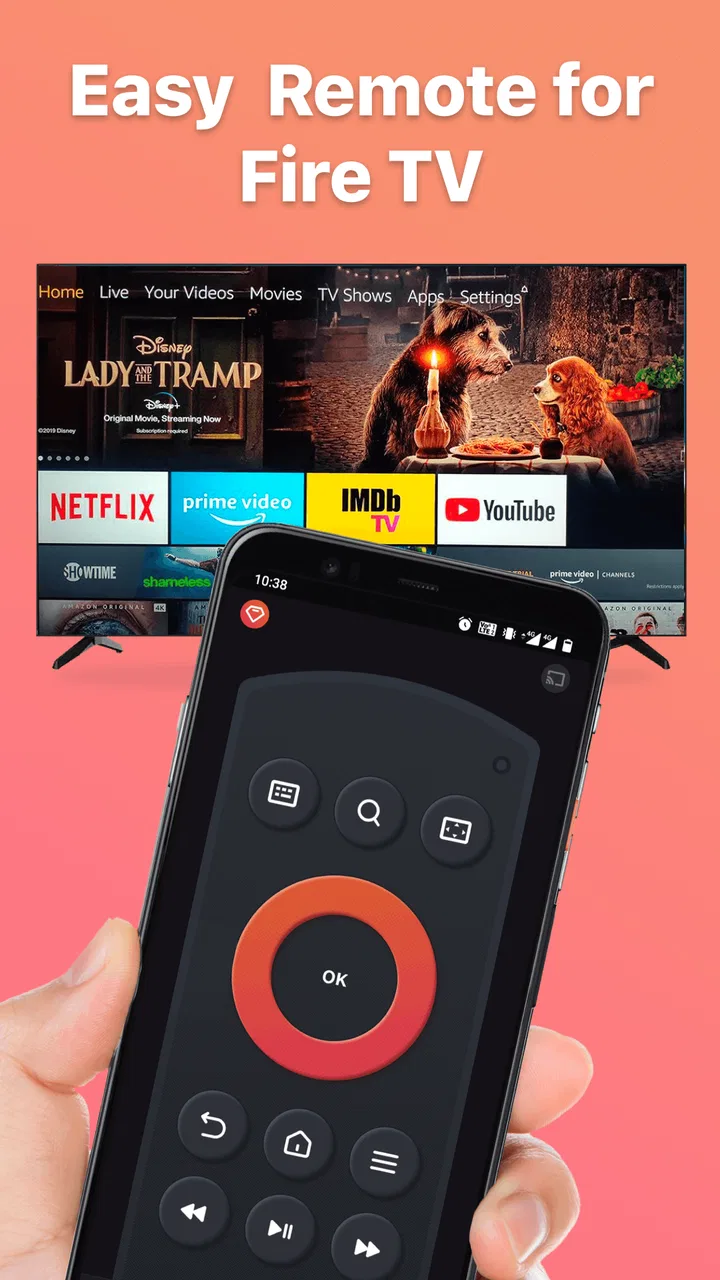
The central feature is straightforward: your Android phone becomes a controller for a compatible Amazon Fire TV or Fire TV Stick. That matters most when the original remote is unavailable, but it is also useful when the phone is already in your hand while you are browsing, watching clips, or searching for an app. Instead of reaching for a small physical controller, I can use a familiar touchscreen interface to navigate the television.
The difference is particularly noticeable when entering text. Searching for a film title or app with directional buttons can be slow, especially when the title is long or the on-screen keyboard requires repeated movement. A phone-based remote can make that part feel more natural because typing on a phone is already a familiar habit. I would not install this app solely because a physical remote is slightly less convenient, but I would consider it worthwhile if I regularly search for content or share control of the television with other people in the home.
There is also a practical social benefit. A spare phone can become a backup controller for guests, children, or a family member who has misplaced the main remote. That does not mean every phone should permanently replace the original. Physical buttons remain easier to use without looking, and a phone can lock, receive notifications, or run out of battery. The useful way to think about this app is as an accessible second remote that is available when the usual one is not.
Screen mirroring adds a different kind of usefulness
The app also supports mirroring a phone screen to an Amazon Fire TV Stick. This changes the use case from controlling television menus to putting phone content on a larger display. I find that more useful for showing photos, demonstrating something on a phone, or sharing content that is not convenient to view around a small screen.
Mirroring is not the same as casting a video from a dedicated streaming app. With casting, the television may receive the content directly while the phone acts more like a controller. Mirroring reproduces what is happening on the phone, so notifications, orientation changes, and the phone’s own screen behavior can affect what appears on the television. For a quick demonstration or group viewing, that distinction is manageable. For long movie sessions, a native Fire TV app or a service’s own casting option is usually the cleaner choice.
The real strength is having control and mirroring in one place when the Fire TV is already part of your routine. I would not describe the mirroring option as a universal solution for every protected video service or every type of phone content. It is best approached as a convenient way to share compatible screen activity, not as a guarantee that every app will mirror perfectly.
How connection affects the experience
The convenience begins only after the phone and television can find one another. In a normal home setup, that means both devices need to be reachable on the same local network. If the phone is using mobile data, connected to a different Wi-Fi network, or separated by a guest-network arrangement, the app may not be able to control the Fire TV until the network situation is corrected.
This is the first point I would explain to a friend before recommending it. A failed connection does not automatically mean the app is broken. I would check that the phone is connected to the same Wi-Fi network as the Fire TV, confirm that the television is awake, and then reopen the connection screen. If the home has several similarly named networks, such as separate main and guest networks, checking the exact network name on both devices can save a lot of unnecessary troubleshooting.
Once the television is discovered, the app is most useful when I keep the phone close and unlocked. That sounds obvious, but it changes the way the app fits into a viewing session. A physical remote can sit beside the sofa for hours. A phone-based remote competes with normal phone use, battery level, screen locking, and incoming distractions. I see this app as excellent for quick control and backup access, while a physical remote remains better for uninterrupted, hands-free viewing.
A realistic living-room scenario
Imagine arriving home and finding that the Fire TV remote has disappeared after guests have left. The television is already connected to the household network, and your Android phone is on that same network. I would install the app, open it, look for the Fire TV device, and use the phone to navigate back to the home screen. If I need to search for a program, the phone keyboard is likely to be more comfortable than moving through letters with a directional pad.
Later, a visitor wants to show a set of holiday photos stored on the phone. Rather than passing the handset around, I can try the mirroring function and display the phone screen on the larger television. That is a good example of two separate capabilities working together: the remote solves an immediate control problem, while mirroring makes the phone useful as a source of shared content.
The same scenario also shows the limitations. If the devices are not on the same network, the quick fix becomes a setup task. If the television is being used for a long film, repeatedly waking the phone may feel less convenient than finding or replacing the physical remote. And if the content is protected or does not behave well with mirroring, the native Fire TV application is the better route.
Small habits that make the app more practical
I would use a few simple habits to reduce friction. First, I would install and test the app before an emergency, rather than waiting until the physical remote is already lost. That confirms whether the phone and Fire TV can see each other while the television is easy to access. Second, I would keep the phone on the ordinary home network rather than a guest network when I expect to use remote control.
Third, I would treat mirroring as a presentation tool and remote control as the everyday tool. That distinction prevents disappointment. Mirroring is useful when the phone itself is the source of something worth sharing; it is not automatically the best way to watch every streaming service. Finally, I would keep the physical remote available for tasks that require long sessions, repeated button presses, or control without looking at a screen.
One less obvious trade-off is that a phone remote can be easier for text entry but worse for tactile navigation. I can type a title more comfortably on a glass keyboard, yet I cannot feel whether my thumb is over the correct button. That makes the app especially attractive for searching and occasional control, but less ideal for someone who watches television in a dark room and prefers physical feedback.
Where it compares well with usual alternatives
The usual alternatives are the original Fire TV remote, a replacement physical remote, the official control route associated with the television ecosystem, or simply using the Fire TV interface with whatever controller is available. The original remote wins for reliability and tactile comfort when it is nearby. A replacement physical remote may be preferable for a permanent solution, particularly in a household where several people need to control the television without using their own phones.
This app has a different advantage: it is already on a device most people carry. That makes it a strong backup and a convenient option for text-heavy searches. It can also do more than basic navigation by offering screen mirroring, which a simple replacement remote cannot provide. On the other hand, it depends on the phone, network visibility, and a compatible Fire TV setup, so it is not as self-contained as dedicated hardware.
Compared with a general screen-sharing app, its focus is more useful if the target is an Amazon Fire TV Stick. I do not have to switch between one app for remote control and another for mirroring. That focus is also its boundary: if my home entertainment setup is built around a different television platform, this is not the tool I would choose simply because it is free.
The trade-offs behind the free download
The no-cost entry point makes it easy to try, but the app includes optional purchases. I would begin with the free experience and decide whether the regular convenience justifies paying for anything offered inside the app. A person who only needs a remote once after misplacing the original may not gain enough value to spend more. Someone who uses the Fire TV every day and relies on the phone remote could judge the decision differently.
I would also avoid assuming that a high install count guarantees a perfect experience in every home. Network layouts, Fire TV models, phone settings, and the behavior of individual content apps can all influence how smoothly remote control or mirroring works. The 4.1 average rating feels consistent with that reality: the concept is useful and clearly works well for many people, while connection and compatibility issues can affect others.
Another trade-off is attention. Using a phone as a remote puts a second screen in your hand, which can encourage notifications and unrelated browsing during a program. A physical remote keeps the task focused. For viewers trying to reduce phone use, this app may solve a hardware problem while creating a small habit problem.
Who gets the most from it
I think this app is a particularly good fit for people who frequently misplace the Fire TV remote, households that want a backup controller, and viewers who search for titles often. It also suits anyone who occasionally needs to show phone content on a Fire TV Stick without setting up a separate sharing workflow. The fact that it supports Android 7.0 and newer makes it accessible to owners of older Android phones as well as newer devices.
It is less suitable for someone who wants a permanent, button-based controller with no dependency on a phone. I would also steer away from it if the television is on a separate network that I cannot manage, if I mainly watch long programs and dislike unlocking a phone, or if my main goal is flawless playback from protected streaming applications. In those cases, the original remote, a compatible replacement, or the streaming service’s own casting method may be a better match.
Families should think about shared access too. A phone remote is convenient when one person has the phone, but it can become awkward if that person leaves the room with it. A physical remote is naturally communal. The app works best when the household treats it as an additional way to control the television rather than the only controller.
My recommendation after weighing the experience
BoostVision has made a focused Entertainment app that addresses a familiar problem without requiring a separate piece of hardware. The remote function is the reason to install it, especially for quick recovery after a lost remote and for faster text entry. Screen mirroring broadens its usefulness, but I would use that feature selectively and keep expectations realistic about how different phone content behaves on a television.
For me, the deciding question is not whether a phone can control a Fire TV; it is whether I want that convenience often enough to accept the network and phone-related trade-offs. If the answer is yes, the free download makes trying it sensible. If I only want a controller that works by feel during a long evening of television, dedicated hardware remains more comfortable.
My final view is positive but practical: Remote for Fire TV & FireStick is most valuable as a reliable backup, a text-search shortcut, and a convenient bridge between a phone and a Fire TV Stick. I would recommend testing the connection before relying on it, using mirroring for suitable sharing situations, and keeping the physical remote nearby when possible. Used that way, it adds genuine convenience without pretending to replace every advantage of a traditional controller.
FAQs for Remote for Fire TV & FireStick
01What features does the Remote for Fire TV & FireStick app offer?
The Remote for Fire TV & FireStick app provides users with a seamless way to control their Fire TV or FireStick devices. It includes features such as voice search, keyboard input, and a user-friendly navigation interface. Additionally, it supports multiple devices and allows for quick and easy device switching.
02Is the Remote for Fire TV & FireStick app compatible with all Fire TV devices?
The app is compatible with most Fire TV and FireStick devices. However, it's essential to ensure that your device supports remote control functionality and is connected to the same Wi-Fi network as your smartphone. Always check the app’s compatibility list before downloading to avoid potential issues.
03Do I need an Amazon account to use the Remote for Fire TV & FireStick app?
Yes, an Amazon account is necessary to use the Remote for Fire TV & FireStick app. This account allows you to sync with your Fire TV or FireStick device, ensuring full access to all features. Make sure you’re logged into the same account on both your device and the app for optimal performance.
04Are there any in-app purchases or subscriptions required for the Remote for Fire TV & FireStick app?
The Remote for Fire TV & FireStick app may offer a free version with basic features. However, for an ad-free experience or additional functionalities like advanced settings, you might need to make in-app purchases or subscribe to a premium version. Check the app store for detailed pricing information.
05How can I troubleshoot connectivity issues with the Remote for Fire TV & FireStick app?
If you experience connectivity issues, ensure your Fire TV and smartphone are on the same Wi-Fi network. Restart both devices and the app to refresh the connection. If problems persist, checking the app’s support section or contacting customer service for further assistance can be helpful.
Pros
- Easy setup with quick connection
- User-friendly interface for all ages
- Supports voice commands efficiently
- Seamless navigation through channels
- Customizable remote layout options
Cons
- Occasional lag in response time
- Ads can be intrusive at times
- Limited features in free version
- No support for older FireStick models
- Requires stable Wi-Fi connection

Remote for Fire TV & FireStick
Gallery